- Mobile App
- iOS & Android
DCN Document Compliance app
Production-floor teams fill in quality checks, inspections and logs on a phone or tablet, by typing or writing on screen.
- Project
- Mobile App
- Built with
- iOS & Android
- Status
- Live
- Website
- documentcompliance.com
About the client
Who they are
Document Compliance Network makes food safety compliance software that automates supplier documents and keeps manufacturers audit-ready.
The brief
What they needed
Floor staff needed to replace paper forms with something they could fill in on the spot, on the devices they already carry.
Our approach
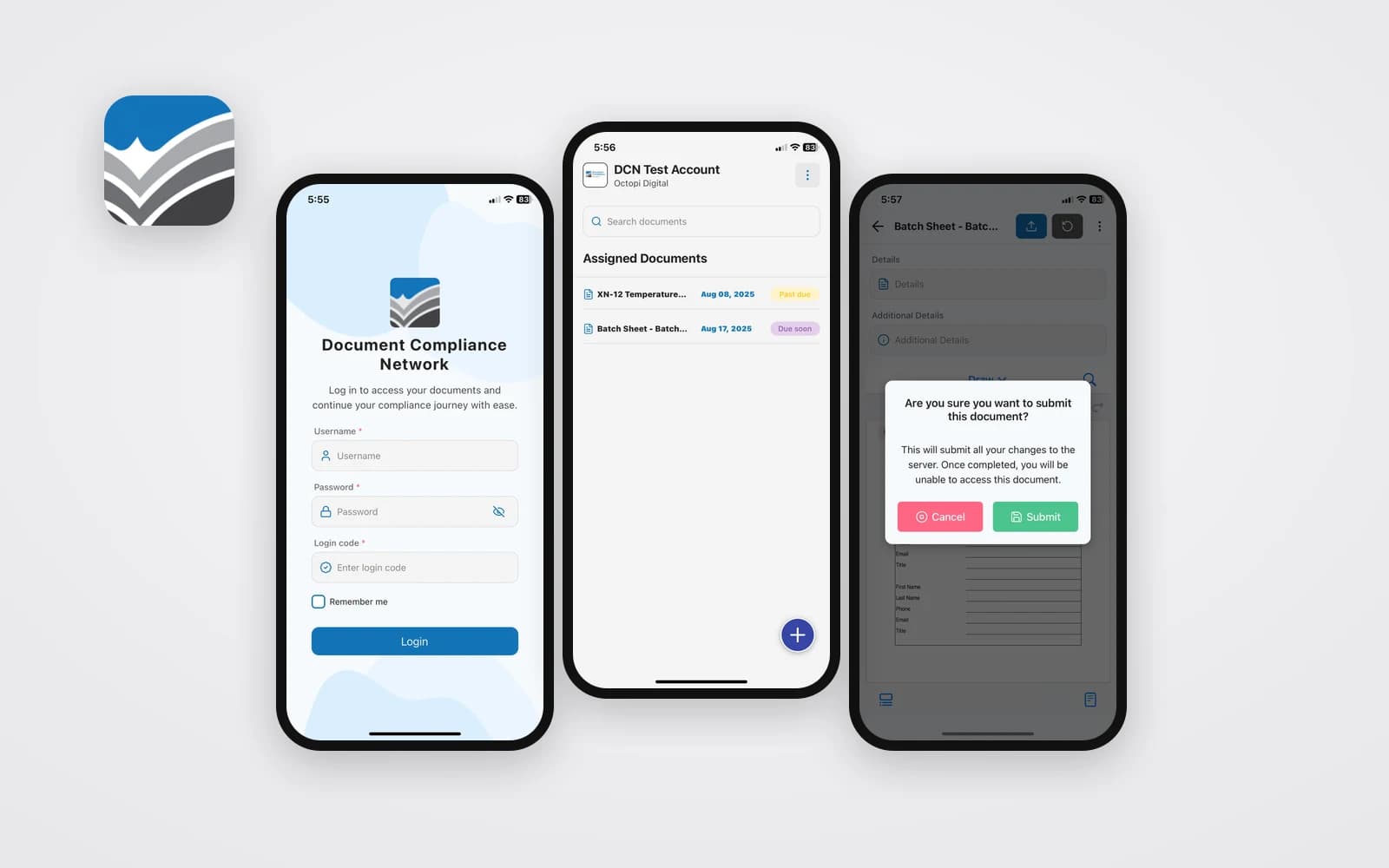
We built the Document Compliance Network app for iOS and Android: team members see their assigned documents, fill them in by typing or writing with a finger or stylus, and submit them straight to the DCN platform for approval.
The business
Compliance software for food manufacturers and their suppliers
Document Compliance Network is a U.S.-based, cloud platform that collects and organizes the documents food companies need for audits. It handles COAs, SQF, BRCGS and FSSC 22000 certifications, HACCP documents, FSMA 204 forms, insurance files and internal QA records.
The platform covers supplier, customer and internal documents, plus SOPs and policies. Suppliers can send documents by email without a portal login. DCN also lists solutions for pharma and life sciences, manufacturing document control and retail supplier audits.
The app
Production forms that live on the plant floor
The web platform handles document control. The mobile app covers the forms floor staff fill in during production. DCN presents these digital production forms as working on iPads, Android tablets and phones, which lets a team replace clipboards with the devices already on the line.
Inside the app, the work is organized around each person's own list. Overdue items stand out, and a search box helps on a long shift.
Personal list of assigned forms
Due and past-due status
Typing or finger and stylus input
Company code at sign-in
The workflow
From a filled form to an approved record
A completed form leaves the device and lands in the DCN web app, where it enters the same review and approval process as other controlled documents. The platform's feature set around it includes version control, an audit trail, role-based access, automated workflows and a traceability dashboard, so mobile entries become part of the record auditors review.
Built for iOS & Android
One app for both mobile platforms
The app runs on iOS and Android, so it works on the mix of tablets and phones found across a plant. It is listed under Features as Mobile App on the DCN site, alongside the Customer Login for the web platform.
Want this working for your business?
Book a free strategy call and we'll show you where to start.
What we built
Inside the mobile app
4 pieces we designed and built, and what each one does for the people who use it.
Assigned documents
Each user sees their assigned forms with due and past-due status, plus search.
On-screen markup
Forms are filled in by typing or drawing with a finger or stylus.
Submit to the platform
Completed forms go straight to the web app for review and approval.
Secure company login
Username, password and company login code.
Every missed call is a job for someone else
See how an AI front office would handle calls for your business, on a free call.
Related Projects
All Work
- Mobile App
- iOS & Android
TrustPatrick Referral Network app
Homeowners find vetted local contractors and send service requests, with location-based matching.

- Mobile App
- iOS & Android
OptimalMD app
Members reach virtual care, specialists, $0 medications and $0 lab tests from their phone.
Want something like this?
Tell us about your project. We'll show you how we'd build it and what it would cost.

